The Operating Record
Since early 2026 my daily setup has been a Mac Mini, a MacBook Air, and a Windows PC with a dedicated GPU, feeding up to eight agents into one dashboard.
Over a 60-day stretch I tracked shipped project work against my single-agent baseline. The result was roughly 5x throughput. Not 5x typing speed. 5x finished work moving through the queue.
The Experience
Your laptop has terminal windows stacked top to bottom. One is refactoring authentication. One is writing content. One is debugging a deploy. One is investigating a production bug. You open Hive on your phone. The stack matches your screen. Each strip has a dot. Green means working. Red means done. Yellow means it needs you.
One strip turns red. You already know it is the writing agent because that terminal sits second in the stack. You tap it, type "Start the next chapter," and it goes green again.
Later another strip turns yellow. It needs a quick answer. You send two sentences, it keeps moving, and the finished agent gets the next task. Your phone buzzes when an agent finishes work, and a notification tells you which one and what it needs when something gets stuck. All the agents stay visible, reachable, and easy to steer from one screen.
What It Is
Hive is a local daemon and dashboard for terminal-based AI agents. Claude Code, Codex, and OpenClaw work out of the box. Any other terminal agent can be added through a three-line config file, or you can ask one of your running agents to add it for you. You can run one agent or up to eight per machine. The dashboard mirrors your terminal order from top to bottom, so the first strip on your phone is the first terminal on your screen. You manage agents by position, not by memorizing session names.
The useful part is not just parallelism. It is persistent context. One agent is an hour deep into an auth refactor and knows every file it touched. Another has been debugging a deploy long enough to understand the infrastructure. These are not disposable subagents inside one prompt. They are separate working memories, each carrying real context forward. Hive is the layer that lets me keep track of them without rereading terminals every time I switch attention.
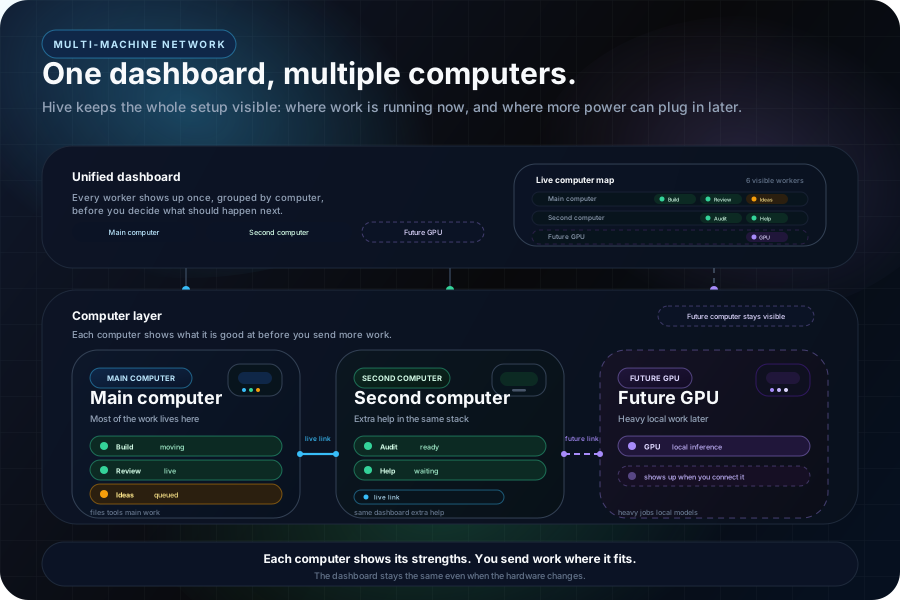
Connect a second computer and its agents appear in the same dashboard. Invite another person and they see the same tiles you see, with live presence and message attribution. Route tasks to specific models or to machines with the right hardware. The dashboard runs as a PWA on your phone, as a hosted page on any browser, or as a native desktop app.
Hive was built the same way it is used. Claude agents wrote most of the daemon and dashboard. Codex later audited the system and caught gaps between the docs and the code. That is part of the point. Each provider is building on its own strengths, and those strengths complement each other. Claude goes deep on architecture and reasoning. Codex moves fast through targeted code changes. OpenClaw gives you reach beyond any single vendor. The system sits above all of them, so you can conduct different models like instruments in a symphony instead of being locked into one provider's blind spots.
The Gap
A single terminal agent already feels good. You give it a task, it reads the codebase, runs commands, writes code, and iterates. Then you open a second instance. And a third. And a fourth. The intelligence scales faster than the management.
There is no shared control layer. No quick view of which agent is waiting. No safe way to stop two agents from editing the same file. No clean handoff when one agent discovers something another needs. You end up alt-tabbing between terminals and manually carrying context across sessions.
That is the gap. AI labs are shipping smarter workers. They are not shipping the operating layer for running a fleet. Docker made containers easy to start. Kubernetes became necessary when you had too many to manage by hand. Multi-agent work is in that phase now.
How It Works
The daemon runs locally. In the default flow you run npm run launch, which starts the daemon, opens a public tunnel, deploys the dashboard to your Vercel account, and keeps everything running in one terminal. The terminals stay on your machine. The remote piece is just the dashboard. Underneath that are the coordination API, live WebSocket updates, and periodic state snapshots so queues, locks, and routing survive restarts.
Auto-Discovery
Open Claude Code, Codex, or OpenClaw in a terminal and it shows up within a few seconds. Close the terminal and it disappears. There is no registration step. The daemon discovers the process, working directory, and session file automatically. Any other terminal agent can be added by defining a process name and launch command in a config file. The daemon watches the file and picks up changes without restarting.
Spatial Mapping
Open Terminal windows and stack them top to bottom. Hive reads their vertical positions and mirrors that order in the dashboard. The top terminal becomes the top strip. The bottom terminal becomes the bottom strip. Add or remove agents and the stack adapts.
That matters because position becomes the label. When the third strip turns yellow, you already know which terminal to think about. Move a terminal higher or lower and the dashboard follows it within a few seconds.
Status Detection
Each strip shows green, red, or yellow. Getting that color right takes a stack of overlapping signals. Real-time hooks fire on tool use and status changes where supported. Pattern analysis of session logs tracks conversation flow. A CPU signal catches the gap between text generation and the next hook, when every other signal goes quiet: above 8% CPU means working, even when hooks and logs are silent. Terminal-output checks round out the picture. One method alone creates false positives. Together they produce a reliable signal.
Auto-Pilot
Claude Code pauses for permission prompts. With one agent that is fine. With several agents it becomes dead time you only notice later.
Auto-pilot handles the routine ones. The dashboard shows the prompt briefly so you can step in, then auto-approves after a short grace window if you do nothing. That keeps the agents moving instead of stacking up behind dialog boxes. The prompts it cannot safely answer, the genuine permission questions that need your judgment, surface as a yellow card for you to handle. Those are rare. Between auto-pilot clearing the routine ones and yellow flagging the few that matter, most stalls resolve without you opening the dashboard.
Coordination
Multiple agents in shared codebases eventually collide. One is changing a schema while another is coding against the old one. Two agents reach for the same file.
Hive ships a set of coordination primitives for that. Peer summaries surface what the other agents are doing. File locks block overlapping edits. Inter-agent messaging routes questions or tasks directly to another session. A shared scratchpad holds temporary context. An artifact tracker records which agent changed which files. A conflict check warns if another agent recently touched the file you are about to edit.
There is also a task queue with structured handoffs. Push work into it and the next idle agent picks it up. Tag related tasks with a workflow ID and the system carries context forward automatically: the actual git diff, the agent's verbatim output, and a structured data block. Tasks can block on other tasks. You queue a multi-step pipeline, mark each step with a blockedBy field, and the agents execute in sequence without manual routing. The system verifies that the codebase is in the right state before each step begins, and flags uncommitted files or merge conflicts so the next agent does not build on broken foundations.
Tasks can target specific models, require specific hardware capabilities, or prefer a specific machine. A task marked requires: ["gpu"] waits in the queue until a machine with a GPU has an idle agent. A task marked model: "codex" only dispatches to Codex instances. The routing is automatic.
Compound Learning
An agent spends twenty minutes debugging a path resolution bug. It finds the fix. The session ends. Tomorrow, a different agent hits the same problem and spends another twenty minutes arriving at the same solution.
Hive's learning system prevents that. When an agent solves something non-obvious, it writes the lesson back to the project. Future agents search those lessons by keyword instead of reading everything, so the right knowledge surfaces without wasting context on irrelevant entries. After months of running, the system has accumulated debugging insights, style corrections, and architectural decisions that a fresh agent would miss.
Multi-Machine
A second computer connects to the daemon as a satellite. Run one command on the MacBook and its agents appear in the same dashboard as the Mac Mini's agents. Same tiles, same dots, same messaging. The satellite registers its agents over WebSocket, and from the dashboard's perspective they are identical to local ones. Windows PCs connect natively through a PowerShell installer, with WSL2 as an alternative path, and Linux machines join the same way. A setup script handles the entire installation: Node.js, Claude Code, and the satellite daemon, registered as a service that starts on boot. An NVIDIA GPU shows up with its name and VRAM in the capabilities report, so heavy model work routes there automatically.
Each machine auto-reports its hardware capabilities: CPU, RAM, GPU, VRAM, installed software. Custom tags can be added through a config file. The dashboard knows which machine is better at what. Tasks route to the right hardware the same way they route to the right agent.
Satellites run as background services and survive sleep, reboots, and terminal close. If a satellite gets into a bad state, it self-heals automatically. A connected primary can trigger repair or reinstall remotely. npm run doctor handles local recovery. The system is designed so that the dashboard is the only interface you need. Every time you would have to open a terminal to debug Hive infrastructure, that is a product failure.
Everything Else
Talk to agents from anywhere. Open the dashboard on a phone, tablet, or second screen and send a message straight to any running agent. If the agent is busy, the message queues and drains when it is ready.
Walk away without losing the thread. Start the agents, close the laptop, and come back later. Green strips kept going. Yellow strips need judgment. Red strips are ready for the next task. Push notifications fire two ways: macOS native alerts when an agent gets stuck, and Web Push to your phone when an agent finishes. The dashboard is a PWA. Add it to your home screen and it runs full-screen like a native app with its own icon, instant repeat loads, and push notifications on iOS and Android.
Catch what shipped. Hive auto-detects git pushes, pull requests, and deploys across all agents and collects them in a review queue. A slide-out drawer on the dashboard shows everything that went out, so you can review changes without tracking which terminal did what.
Run it as a desktop app. A Tauri-based wrapper bundles the daemon, dashboard, and a local Node runtime into a native macOS application with its own onboarding flow. Same system, no terminal needed to start it.
Mark what matters. Any strip can be flagged so you remember which agent to revisit first when you come back.
Multiplayer
The same way a second computer connects to the dashboard, a second person can too. Invite someone with a name and a role. They get a token, paste it in, and they see the same tiles you see. Same green dots. Same yellow dots. Same everything.
There are three roles. Admin has full control: spawn agents, kill agents, send messages, invite people. Operator can send messages and manage tasks but cannot spawn or kill. Viewer can watch but not touch. You pick the right one when you invite someone.
When two people are connected, the dashboard shows it. A presence bar appears with who is online. Messages show who sent them. When I type "fix the auth bug" and send it to an agent, my co-builder sees "Rohit: fix the auth bug" in the chat. The agents do not care who is talking. They just work.
The use case is co-building. Two people working on the same project, each directing different agents, watching each other's progress on the same grid. One person handles the frontend agents, the other handles the backend. You are not in a meeting. You are not on a call. You are both just looking at dots and typing messages.
Eight Contexts, Not Eight Workers
Watch someone use a single Claude Code instance on a hard problem. It spawns internal subagents to parallelize: one reading files, one searching the codebase, one running tests. All of them sharing one context window, one session, one project. When the task finishes, every subagent's context disappears. This is good. Claude already handles internal delegation well and will only get better at it.
Now watch someone run eight separate agents across different projects. One knows the auth refactor. One knows the deploy pipeline. One has absorbed the site's writing voice. Another has been living in video-processing edge cases. The others are carrying their own accumulated context too. It started with four. It grew because the workflow kept scaling.
That distinction is the whole point. These are not eight workers splitting one prompt. They are eight independent contexts. A fresh subagent starts from zero. An agent that has been working for an hour starts from everything it already learned.
The vertical stack is what makes moving between them fast. The third strip on your phone is the third terminal on your screen. Position carries the context, so you stop looking up names and start steering by spatial memory.
Each agent knows who it is. An identity hook fires on every prompt and injects the agent's quadrant (Q1 through Q8), its model, its project, and the status and current action of every peer. Context survives window compaction because the hook regenerates it fresh. The agent always knows its position in the grid and what the others are doing.
The human moves between them. If Q2 is stuck on an API question Q1 already solved, Q1 can answer from deep context instead of rereading the codebase. Hive helps route that handoff, but it is still a handoff between independent working memories, not one shared mind.
If AI labs eventually ship native multi-instance awareness, the manual bridging shrinks. The need for long-running contexts, shared visibility, and durable learning does not.
Orchestration Is the Edge
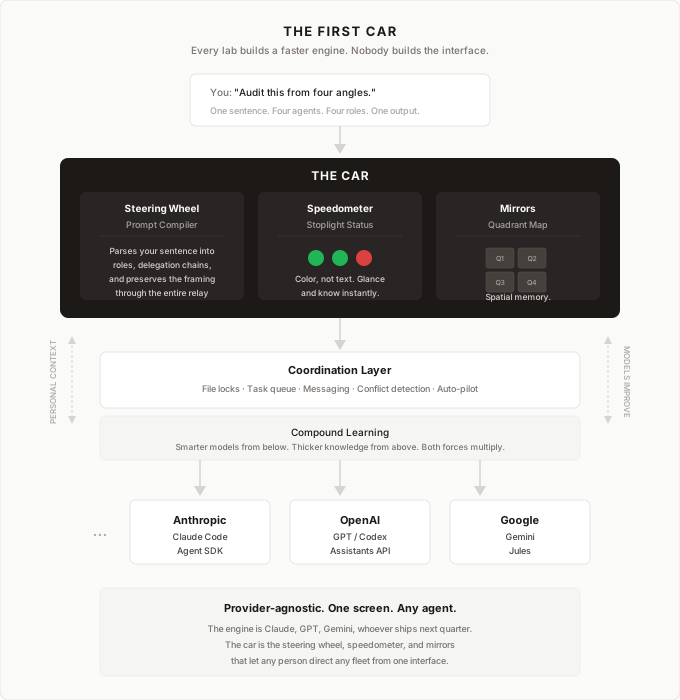
Watch what happens during a real session. Your terminals are open. You type a single prompt into Q1: "Act as a full-scale auditor. Tell Q2 to act as a senior developer. Tell Q3 to act as an investor. They should each go deep into their roles, conduct their analysis, and feed their findings back to you. Your audit should read their responses, synthesize, and pass the complete package to Q4 for final formatting."
Today Hive makes that session manageable, but it does not fully decompose the sentence by itself. A human or lead agent still turns the big instruction into clean follow-up prompts. Hive handles routing, visibility, handoffs, and state once the work is broken apart.
That is the distinction from existing tools. Monitoring products show what agents are doing. Agent frameworks let developers predefine roles in code. Hive sits between them. It is a live coordination layer for real sessions, not just an observer and not a rigid pipeline.
The next missing layer is a prompt compiler. One human sentence in, a structured multi-agent workflow out. The dashboard lets you see the system. The coordination layer lets you run it. Full orchestration is the next step.
Where It Fits
There are three layers here. The bottom layer is the agents themselves. The top layer is the thesis for why fleets matter. The middle layer is the infrastructure that lets those fleets operate on real work.
Hive lives in that middle layer. Not smarter models. Not a new assistant. The operating layer: status visibility, conflict prevention, routing, and memory.
That matters because better models and better memory compound together. AI labs keep improving the engine. Hive keeps accumulating project-specific learning through writebacks, style guides, and prior fixes. A stronger model with richer local memory is more valuable than either one alone.
And both trends make coordination more necessary, not less. The more capable the agents become, the more of them you want running. The more context each one carries, the more expensive it becomes to lose track of them.
The End State
When I started, the proof of concept was two Macs connected over WebSocket, three agents on the primary, two on the satellite, a mix of Claude and Codex. That is no longer aspirational. It is how I work every day. A Mac Mini, a MacBook Air, and a Windows PC with a dedicated GPU all feed into one dashboard. Multi-machine is stable across operating systems, satellites self-heal, and agents from any supported model share one grid.
The end state is bigger. Think about it as a company. Each computer is a business unit with its own capabilities. Each agent on that computer is a worker. The dashboard is the CEO's view. One person sees every business unit, every worker, every task in progress, and moves priorities between them. That is the metaphor, and the architecture is built to match it.
Tasks already route by model and hardware capability. A second person can already watch and direct from the same dashboard. Physical devices can register too: a phone camera, a temperature sensor, a Raspberry Pi. They push data through the same daemon, and agents process it the same way they process code tasks. The protocol is generic. Register, push data, receive events. Anything that can make an HTTP request can join the network.
What remains is polish. Projects referenced by name instead of filesystem path, so any machine resolves them locally. Workers fully disposable, so if one dies the task returns to the queue and any machine picks it up. Every failure mode self-heals by default. The human never opens a terminal to debug Hive infrastructure.
The labs are incentivized to make their own agents better, not to make competing agents easy to manage from one screen. That is why this layer probably has to exist outside any one provider. The engine matters. But the thing that makes engines usable is the dashboard, the steering wheel, and the mirrors. AI labs are building faster engines. Hive is trying to build more of the car.
What It Does Not Do
It does not make the models smarter. They still hallucinate, drift, and run out of context. Hive just lets you see those failures sooner.
The biggest limitation is still context. When a session fills up, its behavior changes. Longer yellow states, more stalls, worse output. The dashboard makes that pattern visible so you can restart the agent before the work decays too far.
It also is not for everyone. If you use AI one conversation at a time, you do not need this. It is for the point where parallel work becomes harder to track than to start.
Try It
It has helped my workflow a lot. I can see what my agents are doing, notice when something looks off, and steer from my phone. The loop is simple: describe, watch, adjust.
Hive runs natively on macOS, Windows, and Linux, with WSL2 as an alternative path on Windows. The fastest way to install is to paste one prompt into Claude Code or Codex and let the agent handle setup, dependencies, and deployment. Or do it yourself: clone the GitHub repo and run bash scripts/install.sh --fresh. That gives you a running daemon and a hosted dashboard you can open from any device. Start with one or two agents and scale up from there. A second computer can join the same dashboard with one command, including a Windows PC with a dedicated GPU. A native desktop app is also available if you prefer that over the terminal.
For the thinking behind how the visual layer works and what it feels like in practice, read A Visual Workflow for AI Agents.