How This Started
Four AI agents running at the same time, each one working on a different piece of a system, sometimes in completely different projects. Then four became six, then eight. More agents means more things getting built at once, but at a certain point I had no idea at a glance what any of them were doing. I had to read terminal output, scroll through it, and try to hold the state of all those threads in my head. The energy I was spending just knowing where things stood was eating the energy I needed to think about where things should go.
So I built something to fix that.
What I ended up with is closer to a coordinated worker pool than a set of unrelated chat windows. Any agent can see what the others are doing. Any agent can audit the others. Any agent can send work to the others. They are still independent sessions with their own context, but the coordination layer connects them into something where the whole is more than the sum of its parts. You can run one agent or up to eight. The dashboard grid adapts to match.
It addresses four challenges at once. A visual layer that makes everything glanceable. Handoffs that feel like talking, not routing. Different AI models in the same grid, each doing what it is best at. Multiple computers connected to one dashboard so work can move to the right machine. That is really the frame for the rest of this piece.
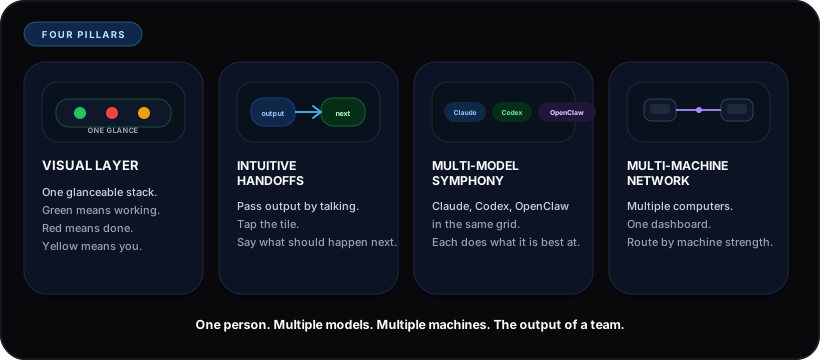
The rest of the article is just those four ideas expanded into what they feel like in practice.
The Traffic Light
Think about driving. You do not read engine diagnostics to know what is happening, you just glance at the dashboard. Green light means you are good, red means stop, yellow means pay attention.
That is basically what I made. Tiles stacked vertically on a screen, matching my terminal layout. The top tile is the top terminal, and the bottom tile is the bottom terminal. Each tile is a full-width strip showing an agent, and the color tells you the state. Green means working, red means finished or stopped, and yellow means it needs a decision from you. No logs or terminal scrolling, just color and position. You can have one tile or up to eight, stacked top to bottom.
The mapping happens automatically. The daemon reads the vertical position of each terminal window on your screen and assigns slots to match. Move a terminal higher, and within ten seconds it moves up in the dashboard stack. You never configure which agent is which tile. The system figures it out from where your windows actually sit.
The nice thing about this is that you do not choose to notice a red dot among green dots, your brain just flags it. Reading a log takes effort, but glancing at a color does not. Four terminals streaming text compete for your attention, while four colored dots fit in a single glance.
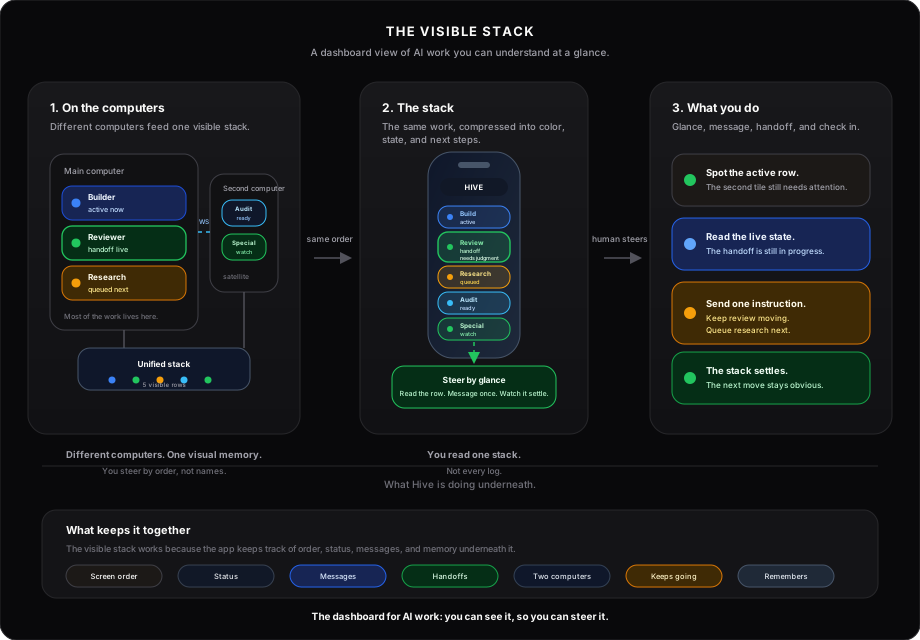
In practice, I went from spending mental energy trying to reconstruct what each agent was doing to just spending it on deciding what to build next and whether things were going in the right direction. That was a big shift for me.
What Surprised Me
Once I could see the agents working, I stopped reading logs and started just noticing when something looked off. An agent has been yellow too long, or the pattern of three green tiles and one yellow tile looks different from four green tiles in a way that text never communicated. I was not analyzing anymore, I was just recognizing, and it was usually right.
Part of why it works is that the tiles match my actual screen. My Mac mini has terminals stacked vertically, and the dashboard on my phone has tiles in the same vertical order. The top terminal is the authentication refactor, and the top tile on my phone is the same thing. I see a yellow dot third from the top and I already know which agent that is, because I can see the third terminal on my screen. I never have to read a name because the dashboard mirrors what is already in front of me. Whether I am running three agents or eight, the spatial memory works the same way.
And because it is on my phone, I do not have to be at my desk. The agents keep running on my Mac mini at home, and I can be on the couch, at a coffee shop, wherever. I glance at the tiles, and if something needs steering I send a message. When an agent finishes, my phone buzzes. When one gets stuck, a notification tells me which one and what it needs. The work does not stop when I walk away, and most of the time I come back and things are finished. The agents handle routine approvals on their own, so they just keep going. The yellow dot only shows up when something genuinely needs me.
The system also reinforces the spatial model automatically. An identity hook fires on every single prompt and injects the agent's quadrant (Q1 through Q8), its model, its project, and what every other agent is currently doing. Context survives compaction because the hook regenerates it fresh each time. The agent always knows who it is and who its neighbors are.
After a few weeks of using it I do not think "Agent 3 has been waiting for a long time." I just feel that the grid looks wrong, and I respond to that faster than I ever responded to log output.
Moving Work Between Agents
The spatial layout makes it natural to move work between agents. I do not think in terms of agent IDs or session names, I think in terms of position. That one found something, send it to that one. The grid gives you a visual memory of what is where, and that is enough to direct traffic between them without reading any of the actual output. You are just pointing.
One agent finishes something and its tile turns red. I read what it produced, tap the next agent's tile, and say "take what that agent just built and write tests for it" or "read the file it created and extend it." Hive delivers that message straight to the other agent's terminal. The second agent picks it up and keeps going. The handoff happens in plain English. You are not copying files or switching windows. You are just talking to the next tile.
For multi-step work where I know the sequence ahead of time, there is a task queue that handles this automatically. You tag related tasks together, and when the first agent finishes, the system passes the actual git diff, the agent's verbatim output, and a structured data block to the next agent before it starts. The system also verifies that the codebase is in the right state before each step begins, and flags things like uncommitted files or merge conflicts so the next agent does not build on top of something broken. The second agent does not start from zero. It starts from verified, structured context that the first one left behind.
For quick handoffs I tap and type. For planned sequences I queue it and the system carries the context forward. Tasks can also block on other tasks. You queue a four-step pipeline, tag each step with the same workflow ID, and the agents execute it in order without you routing each one. The first agent finishes, the daemon passes git diff and output to the second, the second starts with verified context instead of zero. You set it up and walk away.
Underneath the handoffs there is a safety layer. If two agents are working in the same project, the system prevents them from editing the same file at the same time. It warns if another agent recently changed something you are about to touch. Agents can also leave notes for each other that expire after an hour. You do not manage any of this. It just keeps agents from stepping on each other while you focus on directing the work.
Different Models, Same Grid
Right now, my tiles are running a mix of Claude and Codex. Different providers, different strengths, same grid. The models do not know about each other. They do not need to. I am the bridge. I see all the tiles, I decide what matters from one agent's output, and I point the next one at it.
One of the more useful things that came out of mixing models was having the Codex agent audit the whole system while the Claude agents kept building. Codex found inconsistencies between what the documentation said and what the code actually did. Things the Claude agents had drifted on over weeks, because they had written both the code and the docs and stopped noticing the gap. A different model with a different perspective caught what three instances of the same model missed. That is not just a nice bonus of running mixed models. It is a reason to do it on purpose.
Each company is building on its own strengths, and those strengths complement each other. Claude thinks deeply about architecture. Codex moves fast through surgical edits. OpenClaw gives you reach beyond any single provider. The better pattern is to let each one do what it is good at, bounce work between them, and use one to audit the corners the other one missed. Hive is what lets you conduct that. You are not choosing an instrument. You are the maestro, and different models are the instruments in the symphony.
Multiple Computers, One Grid
I have a Mac Mini on my desk and a MacBook Air I carry around. Both of them run Hive. The MacBook connects to the Mac Mini over the network, and within seconds the dashboard shows agents from both machines in the same stack. Five tiles instead of three. Two of them are on a laptop in the other room. I can message them, check their status, and send work to them the same way I do for the local ones.
The way I actually use this is simple. I click on a terminal and it overlays the tab I have on half my screen. The other half is for notes. I write what I want the agent to do, send it over, and watch the dot. When I am on the couch with the MacBook, the agents on the Mac Mini are still running. The dashboard on my phone shows all of them. I ping-pong tasks between the machines the same way I ping-pong between agents on the same machine. Tap the tile, type the message, the dot turns green.
Hive had a bug where agents from the second computer showed up with the wrong status color. The bug only appeared when two machines were connected, not when testing on one. So I downloaded Hive onto the MacBook, connected it to the Mac Mini, and the bug became visible. A second computer running Hive was used to debug Hive. That was the moment it stopped feeling like a side project.
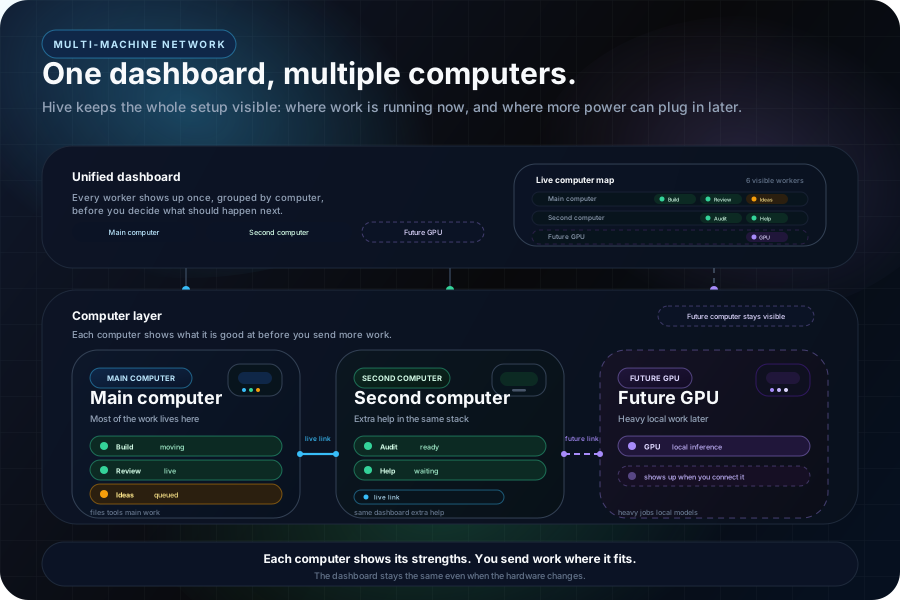
Each computer reports what it can do. CPU, RAM, GPU, VRAM, installed software. When you queue a task, Hive routes it to the machine that fits. I connected a Windows PC with a GPU to the same grid. It showed up as another set of tiles. Heavy work goes to the PC. Code work stays on the Mac. Different machines, different operating systems, same grid. You route by what each one is good at.
What this means in practice is that every computer I own is part of one network. I can see what is running on any of them, send a message to any agent on any machine, and move work between them without switching screens. The Mac Mini, the MacBook, the PC, they all feed into one dashboard. That did not exist before. You had separate machines running separate things and you carried context between them in your head. Now they are all connected and all visible from the same grid.
The part I dreaded most about multiple machines was keeping them in sync. You change something on the Mac Mini, now the MacBook is running old code. You forget to update the PC, now two machines agree and one does not. That kind of drift is invisible until something breaks and you spend an hour figuring out which machine fell behind.
So I made it automatic. When an agent pushes code on any machine, every other machine in the network updates itself. I do not think about it. I push once and within thirty seconds every computer is running the same version. If something falls out of sync, a single check tells me exactly which machine is behind and why. The network stays consistent without me managing it.
Think about it like a company. Each computer is a business unit. Each agent on that computer is a team member. The Mac Mini runs three agents working on code and content. The MacBook has two agents handling design and review. The PC handles GPU work for the heavy lifting. You are the one person who sees all the business units on one screen, knows who is working on what, and moves priorities between them. You are not doing the work. You are directing it. One person, multiple machines, multiple agents, and the output of a team that does not actually exist.
That is the part that surprised me the most. Not that multi-machine works, but that it feels the same. The grid does not change. The dots do not change. You just have more tiles, more contexts, more machines, and the same workflow. Tap, type, watch.
Multiple People, Same Grid
The same way a second computer connects to the grid, a second person can too. You invite someone with a name and a role. They get a token, paste it into the dashboard, and they see the same tiles you see. Same green dots. Same yellow dots. Same everything. Two people watching the same fleet from different screens.
The dashboard only shows multiplayer when it matters. If you are alone, it looks exactly the same as before. The moment a second person connects, a presence bar appears showing who is watching. You see their name, they see yours. Messages show who sent them. When you type "fix the auth bug" and send it to an agent, your co-builder sees "Rohit: fix the auth bug" in the chat. When they send something, you see their name. The agents do not care who is talking. They just work.
There are three roles. Admin has full control: spawn agents, kill agents, send messages, invite people. Operator can send messages and manage tasks but cannot kill or spawn. Viewer can watch but not touch. You pick the right one when you invite someone.
What this actually feels like is Google Docs for agents. Two people looking at the same live system, both able to act on it, both able to see what the other person is doing. The dashboard is the shared document. The agents are the content being written. And the presence indicators tell you who else is in the room.
An Example
Hive itself was built this way. Multiple AI agents running at the same time, each working on a different part of the system, while I directed them through the dashboard they were building. I told them what to build, resolved conflicts when two agents touched the same thing, and bridged context between them when one found something another needed to know. They wrote all the code.
Here is a specific thing that happened. Two agents were debugging the dashboard's own status detection. Agent 3 was investigating why tiles flickered between green and red, and Agent 4 was investigating why activity from one agent was showing up under the wrong tile. Neither knew what the other was finding.
I was just watching the dashboard, and Agent 3 never turned red even when it should have. I noticed that visually, not from a log. Agent 4 found the root cause: one agent's activity was being attributed to the wrong tile, so Agent 3's status was being driven by Agent 4's work. Agent 3, meanwhile, found a separate bug in how the system detected whether an agent was done. Two independent investigations that uncovered two bugs interacting with each other.
I pointed a third agent at both findings and asked it to produce a unified fix. I did not write any code. I just saw something that looked wrong, and it turned out to be wrong. That is the kind of thing the visual layer makes possible.
A more recent one. I told one agent "audit everything" and walked away. It split the work across six agents on its own. One tested every feature live. Another, running a completely different AI model, reviewed the same code from a different perspective. A third checked every install script across macOS, Windows, and Linux. The interesting part was what happened next. The Codex agent found a security problem that three Claude agents had been looking right at and missed. The Claude agents caught things the Codex agent did not notice. Different models, different blind spots, same grid. Within an hour, every finding was fixed and the update had already reached all three computers in the network.
I also added a gate for new agents. When you spawn one from the dashboard, it does not start immediately anymore. A blue dot and an "Approve" button appear on the tile. You see what is about to begin, you tap approve, and then the agent starts. It is a two-second pause that gives you a say in what enters the fleet. The agents do not go until you say go.
Over time the agents push code, open PRs, and deploy. Without a catch layer, you lose track of what actually shipped. Hive auto-detects git pushes, pull requests, and deploys from hook output and collects them in a review queue. A drawer slides out on the dashboard showing one-line summaries of everything that went out. You scan it, mark things seen, and move on. The agents can also self-report when they finish something reviewable. It closes the loop: you see status while they work, you see output when they finish, and you see what shipped when they push.
Underneath all of this, there is a knowledge layer that compounds over time. Every time an agent solves a non-obvious problem, the lesson gets written to a per-project file. Agents search these lessons by keyword instead of reading everything, so the right knowledge surfaces without wasting context on irrelevant entries. After weeks of running, the system has accumulated debugging insights, style corrections, and architectural decisions that no fresh agent would know. The fleet gets smarter because it remembers what it learned, and it finds what it needs faster as the knowledge grows.
What It Does Not Do
It does not make the AI smarter. The models still hallucinate, they still drift when context fills up, and they still need restarting when a task runs too long. The dashboard does not fix any of that, it just makes those problems visible sooner. You see the drift happening instead of discovering it twenty minutes later in a log, and you see the stall instead of wondering why nothing is moving.
The biggest limitation is context. When an agent's context window fills, it compacts memory and starts losing the thread. You can see this on the dashboard because the agent starts behaving differently with longer yellow states, more frequent stops, and output that drifts. You learn to recognize that pattern, and when something feels off you restart the agent with fresh context and it picks up where it left off.
There is also an autopilot that handles routine interruptions. Permission prompts get approved automatically within a few seconds. There is a brief window for me to override from the dashboard, and then the agent keeps going. If an agent gets stuck doing the same thing over and over, another agent is sent to help it try a different approach. If that does not work after a few tries, it shows up as yellow on the dashboard for me to deal with. The stuff that genuinely needs my judgment stays visible. Everything else stays green. If I restart my computer, the system picks up where it left off.
The status detection itself goes deeper than I expected it would need to. Between when an agent finishes generating text and when the next signal fires, there is silence. The session log has not updated, but the process is still burning CPU. An additional detection layer checks process CPU usage. If it is high enough, that means working, even when every other signal says idle. It catches the gap that the other layers miss. Getting the color right required all of them working together.
It also does not care much which AI tool you are running. Claude and Codex work out of the box, and you can run OpenClaw if you want. If your agent runs in a terminal, you can add it. There is a config file where you define the process name and the command to launch it. Three lines. Or you can ask one of your running agents to add it for you. The point is not which AI you are using. The point is being able to see all of them at once and move work between them.
This is also not for everyone. You need to be running multiple AI agents to get anything out of it. If you are using AI one conversation at a time, you do not need this. It is for the situation where you have crossed into running parallel work and you are drowning in terminal output.
Try It
It has helped my workflow a lot. I can see what my agents are doing while they work, tell when something looks off, and send a message to correct it. The whole loop is describe, watch, adjust. You do not need to understand the code to do any of that. You can look at two agents that just finished, point a third one at both, and say "summarize what those two found." The visual layer is what makes that possible, because you are working from what you see, not what you read in a terminal.
It runs on macOS, Linux, and Windows. You can connect multiple computers to the same dashboard, including a Windows PC with a dedicated GPU for heavier work. There is also a native desktop app built with Tauri that wraps the daemon and dashboard into a single application with its own onboarding flow.
Email me feedback and suggestions, please: mangtani.rohit20@gmail.com.